Guide for the office manager
Export your referral report from PBS Endo
One report, saved as a PDF. It takes about a minute. The first time, you run it twice: this year and last year. After that, once a month, just this year.
The report ReferraLens reads
Referral Annual Totals. It lists every referring dentist with the year's production month by month, and the year before beside it. It is built to list referring offices, not patients. If a patient's name ever shows up as a referral source, tell us and we'll delete it within 2 business days.
Steps
Open the report
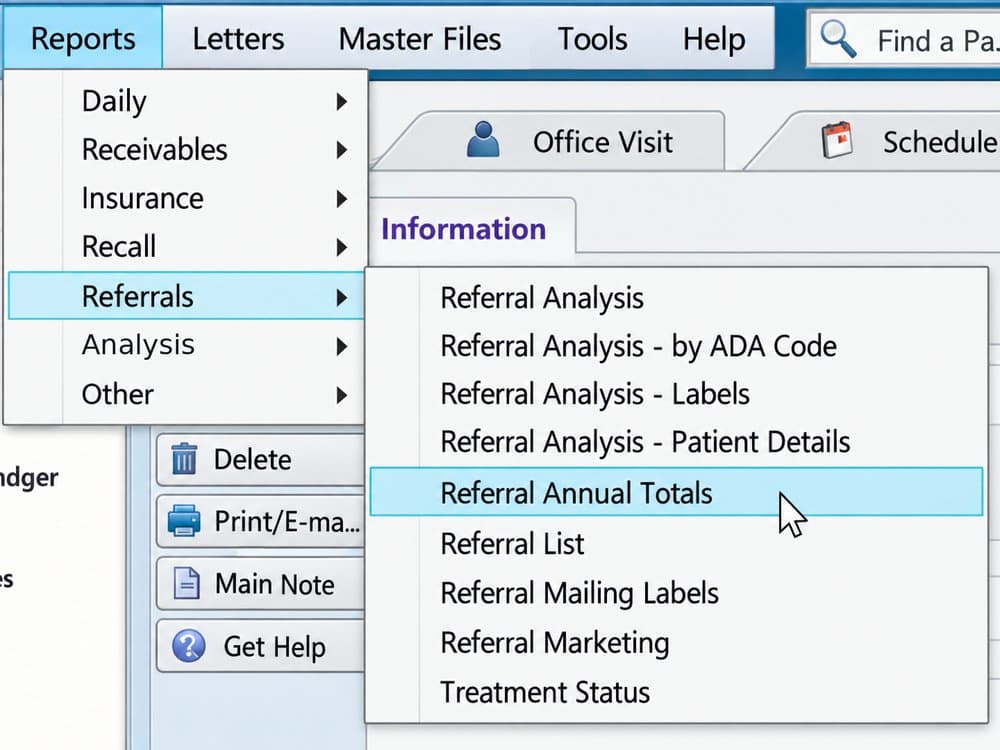
Open PBS Endo. Click Reports on the top menu bar. Hover Referrals, then click Referral Annual Totals.
Set it the same way every time
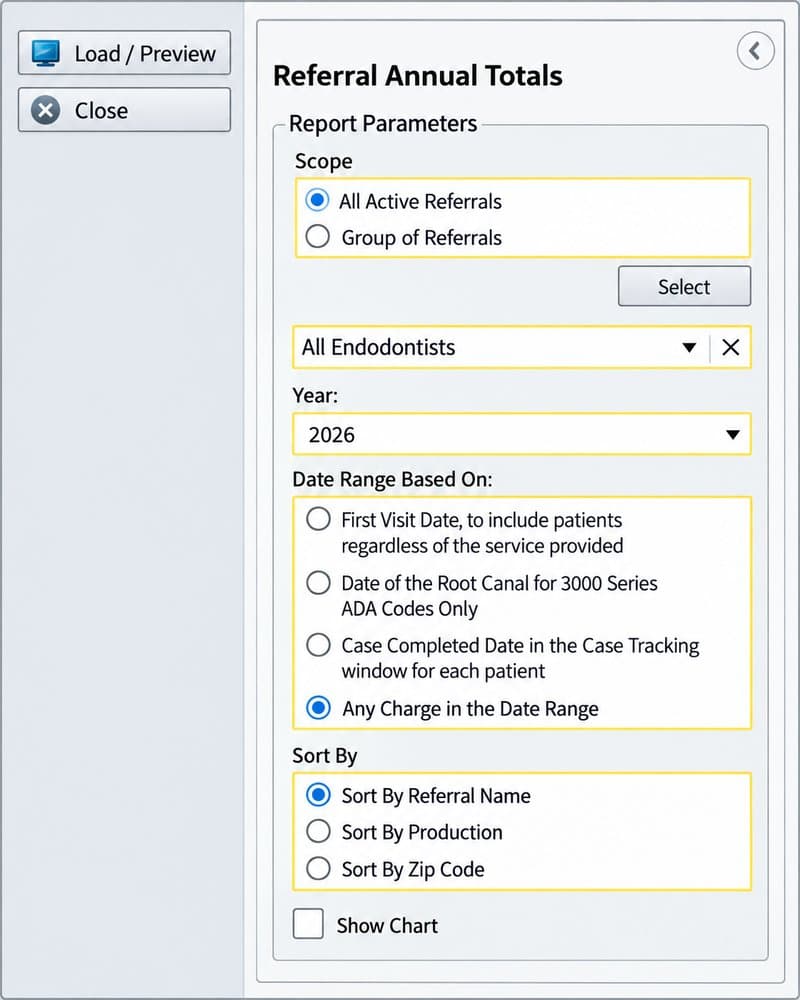
Scope All Active Referrals Endodontists All Endodontists Year This year the first time, last year the second time Date Range Based On Any Charge in the Date Range Sort By Sort By Referral Name Show Chart Leave unchecked The one that matters is Any Charge in the Date Range. The other three count different things. Switching between them from one month to the next makes a dentist look like they changed when they did not.
Load it and check two lines
Click Load / Preview at the top left. The report opens on screen. Under the title it should say Year and the year you picked. The line under that should say Based on Any Charge in the Date Range.
Save it as a PDF
Click Export Report at the top left of the preview and save it as a PDF. PBS Endo names it ReferralAnnualTotal. Add the year and today's date so you can find it later, for example ReferralAnnualTotal 2026 run 2026-09-20.pdf. The name does not matter to ReferraLens. The report says inside which year it covers.
Run it again for last year
The first time only: go back to the settings, change Year to last year, and repeat steps 3 and 4. This year's file leaves out dentists who sent nothing this year. Last year's file is how ReferraLens finds them.
Send both files
During your trial, attach both PDFs to the form at referralens.com/trial/start, or reply to David's email with them. After your walkthrough, when your login is open, drop this year's report on the Upload page once a month as a PDF. Last year's is already loaded.
The first time, your list is back within two business days. After that, within minutes.
If the numbers look off
Nothing after this month. That is correct. A report run in September shows January to September for this year and all twelve months of last year. The empty months at the end of the year are not counted against anyone.
A dentist is missing. Referral Annual Totals lists active referrals. If someone was marked inactive in PBS Endo, they will not appear. Reactivate them in Master Files and run the report again.
Please don't mark referring dentists inactive to tidy the list. Each upload replaces the months it covers, so a dentist who drops off the report also drops out of ReferraLens for those months. The ones most likely to be tidied away are the ones who have gone quiet. Those are exactly the names ReferraLens is there to show you.
The wrong report. Referral Analysis looks similar but covers one year and counts on a different basis. If the PDF's title is anything other than Referral Annual Totals, run it again from step 1.
What you are sending
Referring dentists, their office zip code, and production by month. It is built to list referring offices, not patients. If a patient's name ever shows up as a referral source, tell us and we'll delete it within 2 business days. If a report with patient information is ever sent by mistake, we delete it without loading it and ask for the right one.